
# How to Keep Your GPU Cool: Airflow & Cooling Guide
Keeping your graphics card (GPU) cool is essential for maintaining smooth gaming performance and protecting your gaming PC from overheating. Whether you're using an NVIDIA GeForce RTX, AMD Radeon RX, or building a custom gaming desktop, proper airflow and cooling can improve system stability and help maintain consistent FPS.
In this guide, we'll explore simple ways to reduce GPU temperatures and improve cooling in your gaming PC.
1. Improve Airflow Inside Your Gaming PC Case
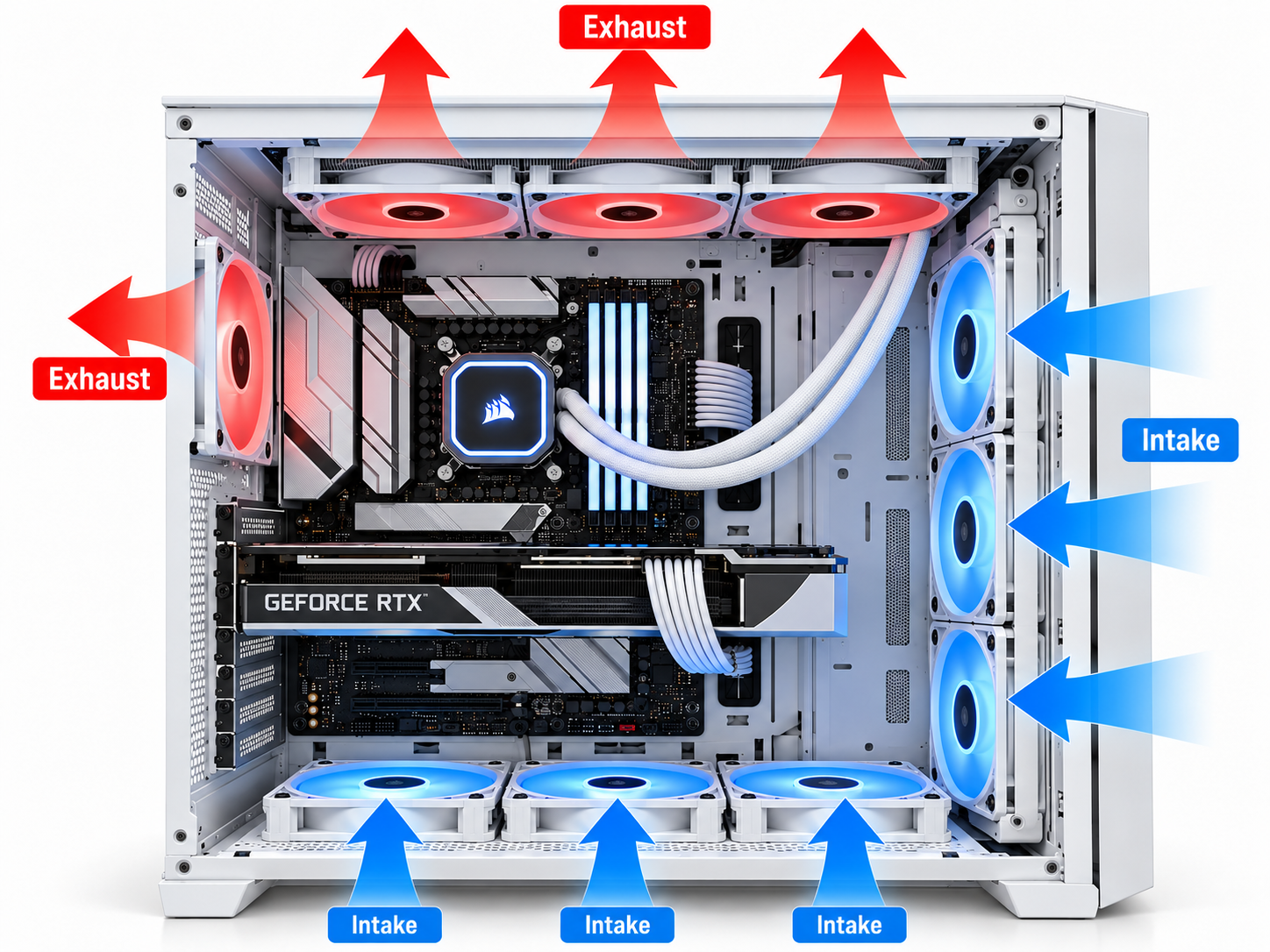
Proper airflow is one of the most important factors in GPU cooling. A gaming PC case with good ventilation allows cool air to enter while pushing hot air outside.
For better airflow:
- Install front or bottom intake fans to bring cool air inside.
- Use rear or top exhaust fans to remove hot air.
- Choose a gaming PC case with mesh panels or good ventilation.
- Keep cables organized to avoid blocking airflow.
A well-ventilated desktop gaming PC helps maintain stable GPU temperatures during long gaming sessions.
2. Clean Your Graphics Card and PC Fans
Dust buildup can reduce cooling efficiency and increase GPU temperatures.
Regularly clean your graphics card fans, heatsink, case fans, and dust filters to maintain airflow.
Use compressed air carefully, prevent fans from spinning freely during cleaning, and always power off and unplug your gaming PC before maintenance.
Keeping your PC clean can reduce overheating and unnecessary fan noise.
3. Adjust Your GPU Fan Speed
Modern graphics cards allow users to monitor temperatures and customize fan speeds through supported software.
Tools such as MSI Afterburner can help you monitor GPU temperatures and configure fan curves on compatible hardware.
Increasing fan speed may reduce GPU temperature, although it can also produce more noise.
Try to find a balance between cooling performance and quiet operation.
4. Monitor GPU Temperature While Gaming
Monitoring GPU temperature helps you identify cooling problems before they affect gaming performance.
Many modern graphics cards operate under heavy gaming loads at temperatures around 60°C–85°C, depending on the model, cooling system, and room temperature.
However, safe operating limits vary by GPU, and hotspot temperatures may be higher than the reported core temperature.
If your GPU is running unusually hot, check your case airflow, fan operation, dust buildup, and manufacturer specifications.
5. Consider GPU Undervolting for Better Cooling
GPU undervolting reduces the voltage supplied to your graphics card while aiming to maintain stable performance.
When configured correctly, undervolting may lower GPU power consumption, heat generation, and fan noise.
However, incorrect settings can cause instability or crashes, so changes should be made gradually and tested carefully.
For beginners, improving case airflow and cleaning fans should come before advanced GPU tuning.
Final Thoughts: Keep Your Gaming PC Cool
Maintaining proper GPU cooling and gaming PC airflow is essential for stable performance and reliable gaming.
By improving case ventilation, cleaning your graphics card, adjusting fan speeds, monitoring temperatures, and considering careful undervolting, you can help prevent GPU overheating and improve your overall gaming experience.
At GameX Pakistan, we offer gaming PC components, graphics cards, gaming cases, and cooling accessories to help you build a better custom gaming desktop.
Explore GameX gaming PC accessories and upgrade your cooling setup today!
Gamex Blog
Ready to build your next rig?
Explore Gamex hardware and custom builds, or get in touch with the team for help planning your gaming setup.